AWS for MERN Stack Developers: Core Services and Setup · Prateek Agrawal
AWS for MERN Stack Developers: Core Services and Setup
AWS for MERN stack developers: choose the right compute, database, CI/CD, and security services to deploy and scale React, Node.js, Express, and MongoDB apps.
Prateek Agrawal··9 min readawsmern stackdevopsdevelopersoftwareengineeringcloud computing
AWS for MERN stack developers can feel broad because the platform offers many services that overlap with each other. This guide maps the core AWS services to the MERN layers—MongoDB, Express.js, React, and Node.js—and shows where each fits in deployment, storage, databases, CI/CD, security, and cost control. Use it as a practical reference before you choose infrastructure.
Key points
Match AWS compute to your deployment model: EC2 for servers, Lambda for serverless, and ECS or EKS for containers.
Use S3 and CloudFront for React builds, and choose DocumentDB or DynamoDB when a managed data store fits better than self-managed MongoDB.
Put IAM, monitoring, and budget alerts in place before you scale.
AWS for MERN Stack Developers: Core Services
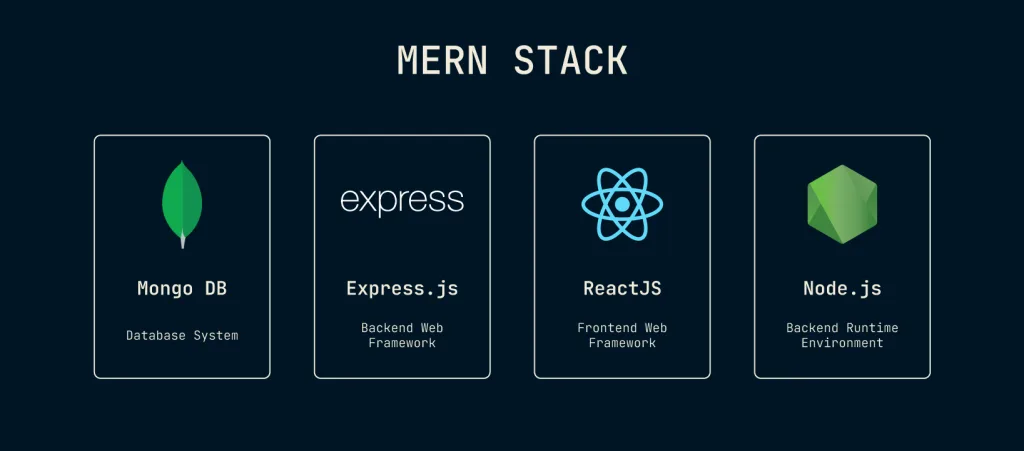
MERN stands for MongoDB, Express.js, React, and Node.js. Each layer maps to a different set of AWS services.
React: static hosting on Amazon S3 with CloudFront as the content delivery network
Express.js and Node.js: Amazon EC2, AWS Lambda, or containers on Amazon ECS or EKS
MongoDB: self-managed on EC2 with EBS volumes, Amazon DocumentDB, or a different NoSQL model on DynamoDB
AWS Cloud Service Models for Developers
Understanding the three service models helps you choose the right deployment strategy for a MERN application.
Infrastructure as a Service (IaaS)
IaaS gives you direct control over virtual infrastructure.
Amazon EC2: virtual servers for Node.js backends
Amazon VPC: isolated private networks for deployment
Amazon EBS: persistent block storage for databases
Platform as a Service (PaaS)
PaaS removes much of the infrastructure management.
AWS Elastic Beanstalk: managed deployment for Node.js applications
AWS Lambda: serverless functions for API endpoints
Amazon RDS: managed relational databases
Software as a Service (SaaS)
SaaS provides ready-to-use application services.
Amazon Cognito: user authentication and authorization
Integration with CloudFront for global distribution
Lifecycle policies for cost optimization
Amazon EBS (Elastic Block Store)
EBS provides high-performance block storage. It suits:
Database storage such as MongoDB or PostgreSQL
Low-latency file systems
Persistent storage for EC2 instances
Snapshot backups
Amazon S3 Glacier
S3 Glacier is low-cost archival storage. It suits:
Application log archives
Compliance data retention
Disaster recovery backups
Cost-effective cold storage
Database Management with AWS
Amazon RDS (Relational Database Service)
RDS is a managed relational database service. It supports:
PostgreSQL: common choice for MERN stack applications
MySQL: traditional relational option
Amazon Aurora: MySQL/PostgreSQL-compatible engine
Benefits for MERN developers:
Automated backups and point-in-time recovery
Multi-AZ deployments for high availability
Read replicas for improved performance
Automated patching and maintenance
Amazon DocumentDB
DocumentDB is a managed document database that supports much of the MongoDB API, but not all of it, so test your queries and indexes first. It offers:
Support for many MongoDB drivers and tools
Automatic storage scaling and backups
Managed security features
Less administrative overhead than self-managed MongoDB
Amazon DynamoDB
DynamoDB is a NoSQL database service. It suits:
Session storage
User profiles and preferences
Real-time applications
Serverless architectures
DevOps and CI/CD with AWS
AWS CodeCommit
CodeCommit is a Git-based version control service. It suits:
Private repository hosting
Team collaboration
Integration with AWS services
Secure code storage
AWS CodeBuild
CodeBuild is a fully managed build service. It suits:
Compiling React applications
Running automated tests
Building Docker images
Generating deployment artifacts
AWS CodeDeploy
CodeDeploy is an automated deployment service. It supports:
Blue-green deployments
Rolling deployments
Canary releases
Integration with EC2, Lambda, and ECS
AWS CodePipeline
CodePipeline automates release pipelines. It handles:
Source code integration
Automated testing
Multi-environment deployments
Release management
Infrastructure as Code
AWS CloudFormation
CloudFormation manages infrastructure from templates. It provides:
Reproducible deployments
Version-controlled infrastructure
Stack management
Resource dependency handling
AWS CDK (Cloud Development Kit)
The CDK defines infrastructure programmatically. It supports:
TypeScript and JavaScript, which fit MERN developers
Python, Java, C#, and Go
High-level constructs
Type safety and IDE support
AWS Security Best Practices
AWS IAM (Identity and Access Management)
IAM controls access to AWS resources. It handles:
User and role management
Fine-grained permissions
Multi-factor authentication
Cross-account access
Security Services for MERN Applications
AWS WAF (Web Application Firewall)
WAF protects against:
SQL injection attacks
Cross-site scripting (XSS)
DDoS attacks
Custom security rules
Amazon Cognito
Cognito provides user authentication. It offers:
User pools for sign-up and sign-in
Identity pools for AWS resource access
Social identity providers
Multi-factor authentication
AWS Secrets Manager
Secrets Manager stores and rotates credentials. It handles:
Database credentials
API keys
Application secrets
Automatic rotation
AWS Messaging and Communication Services
Amazon SQS (Simple Queue Service)
SQS is a message queuing service. It suits:
Decoupling application components
Background job processing
Batch processing workflows
Microservices communication
Amazon SNS (Simple Notification Service)
SNS is a pub/sub messaging service. It suits:
Push notifications
Email notifications
SMS messaging
Fan-out messaging patterns
Amazon SES (Simple Email Service)
SES is an email delivery service. It suits:
Transactional emails
Marketing campaigns
Application notifications
High deliverability
Cost Optimization Strategies
AWS Free Tier
New AWS accounts get a credit-based free plan that ends after six months or when the credits run out, plus always-free allowances on some services such as Lambda and DynamoDB. Check the current AWS Free Tier page for the latest terms.
Cost Management Tools
AWS Cost Explorer
Cost Explorer helps analyze spending. It provides:
Cost and usage reports
Forecasting capabilities
Reserved instance recommendations
Resource optimization insights
AWS Budgets
Budgets sends alerts based on defined limits. It helps with:
Monthly spending limits
Service-specific budgets
Usage-based alerts
Cost anomaly detection
Getting Started with AWS for MERN Stack Developers
1. Create Your AWS Account
Sign up and choose an account plan
Set up billing alerts
Configure IAM users and roles
Enable multi-factor authentication
2. Choose Your Deployment Strategy
Option A: Traditional EC2 Deployment
# Launch EC2 instance# Install Node.js and MongoDB# Deploy your MERN application# Configure security groups and load balancers
Option B: Serverless Architecture
# Frontend: React app on S3 + CloudFront# Backend: Lambda functions + API Gateway# Database: DynamoDB or RDS# Authentication: Cognito
Option C: Containerized Deployment
# Create Docker images for your application# Use ECS or EKS for orchestration# Implement CI/CD with CodePipeline# Monitor with CloudWatch
X-Ray traces requests across distributed systems. It helps with:
Request flow analysis
Performance bottlenecks
Error root cause analysis
Service map visualization
Amazon API Gateway
API Gateway builds and manages APIs. It offers:
RESTful and WebSocket APIs
Request/response transformation
Throttling and caching
Integration with Lambda and EC2
Amazon ElastiCache
ElastiCache provides in-memory caching. It suits:
Session storage
Database query caching
Application performance optimization
Redis and Memcached support
Amazon EventBridge
EventBridge supports event-driven architecture. It provides:
Custom event buses
Third-party integrations
Scheduled events
Event pattern matching
Testing on AWS
AWS Device Farm
Device Farm tests applications on:
Real mobile devices
Different browsers
Various screen sizes
Automated testing suites
Testing Best Practices
Use separate AWS accounts for different environments
Implement blue-green deployments for zero-downtime updates
Set up automated testing in your CI/CD pipeline
Use CloudFormation or CDK for reproducible test environments
FAQ
Can I deploy a MERN stack application on the AWS Free Tier?
For a limited time, yes. Free plan credits can cover a small EC2 instance and S3 for the React build, but the plan ends after six months or when the credits run out, so set a budget alert.
Which AWS database is best for MongoDB in a MERN stack?
Amazon DocumentDB is the most direct AWS-managed option, but it supports only part of the MongoDB API, so test your application against it first. If you need a different NoSQL model or serverless scaling, DynamoDB is another common choice.
How do I deploy a React frontend to AWS?
Build the React app, upload the build output to an S3 bucket, and front it with CloudFront for HTTPS, caching, and global delivery.